

Choosing the right immersive collaboration platform is crucial for delivering exceptional digital experiences.
Today’s platforms don’t just facilitate meetings – they create dynamic spaces where global teams naturally converge, interact, and innovate.
Virtual environments have matured into sophisticated ecosystems that seamlessly blend AI-powered engagement, spatial computing, and rich data analytics.
As organizations embrace fluid work patterns, these platforms serve as digital headquarters where traditional and remote interactions naturally converge.
The market has consolidated around platforms that master the delicate balance of capability and simplicity.
Success requires selecting technology that amplifies your organization’s collaborative DNA while future-proofing your digital infrastructure.
Each platform component must enhance both individual productivity and team synergy while delivering clear ROI.
Though the options have evolved significantly, understanding core capabilities makes selection straightforward.
This guide examines the enterprise collaboration platforms defining workplace interaction in 2025.


Join the Virtual Event Revolution!
Let our crew of creative tech wizards cast an online engagement spell to mesmerize your audiences into a virtual frenzy!
Essential Considerations
Choosing an ideal virtual event platform involves more than comparing individual features.
Step back to examine what truly matters for success.

Your virtual event’s success depends on selecting tools that engage your audience while delivering a polished, professional experience.
Consider these essential factors during evaluation.
Required Features
Each virtual event platform provides unique capabilities.
Some excel at registration and ticketing, while others prioritize networking and engagement.
Carefully assess what your event format and audience require:
- Do you need advanced exhibitor booths and lead generation tools?
- Will breakout rooms and virtual roundtables drive your event?
- Does your audience expect gamification through polls and quizzes?
List your essential features and use them as evaluation criteria.
Budget and Return on Investment
Financial considerations shape business decisions significantly.
Virtual event platforms offer various pricing structures, ranging from per-attendee fees to comprehensive packages.
Consider overall value rather than focusing solely on price.
Premium platforms might cost more initially but deliver greater value through superior functionality, reliability, and dedicated support.
Alternatively, choosing a basic option to save money could result in technical issues disrupting your event.
Find the optimal balance between cost and quality to position your event for success.
Visual Identity and Design
Your virtual event should reflect your brand identity naturally, creating a distinctive experience.
Examine platform design options:
- Can you incorporate your logo, colors, and imagery throughout the interface?
- Are branded registration pages and communication materials included?
More extensive customization creates a cohesive, memorable impression for attendees.
Simple Navigation
Difficult platform navigation frustrates attendees and undermines event success.
Evaluate user experience from both organizer and participant perspectives:
- Does the interface offer clear, logical organization?
- Can attendees easily find and access their desired sessions?
- Does the platform work smoothly across mobile devices and desktop browsers?
Prioritize accessibility features like closed captioning, screen reader compatibility, and keyboard navigation to create an inclusive event environment.
Available Support
Learning curves exist with any platform, particularly for those new to virtual events.
Research each provider’s training resources and customer service:
- Are comprehensive guides and FAQs readily available?
- Can you access training webinars or personalized onboarding?
- What support options exist if technical issues arise during your event?
Expert assistance significantly reduces stress before and during event execution.
Data Protection
Virtual events require safeguarding sensitive attendee information, including contact details and payment data.
Choose platforms prioritizing security and privacy through features like:
- Encrypted data transfer
- Secure payment processing
- Compliance with GDPR and other regulations
For events involving confidential content, examine access controls and permission settings to ensure only authorized users can view and share materials.
Platform Adaptability
Your virtual event platform must integrate effectively with existing tools and systems.
Research integration capabilities for connecting with CRM, marketing automation, analytics, and other essential software.
Seamless data flow between platforms simplifies tracking metrics and nurturing leads after events.
Additionally, consider customization potential.
Can you modify functionality for specific needs or create custom integrations?
More adaptable platforms better support unique event visions.
User Recommendations
Verify vendor claims by examining actual user experiences.
Read reviews on independent sites like G2, Capterra, and TrustRadius, focusing on feedback about usability, stability, support quality, and overall satisfaction.
Consistently positive reviews and high ratings indicate platforms delivering genuine value and meeting promises.
How to Test and Choose the Right Platform
Selecting an excellent virtual event platform requires practical testing to ensure technology matches objectives.
Let’s explore making effective decisions that enhance event success.

Identify Your Event Essentials
Start by identifying critical features.
Each event type demands different capabilities – polls and audience engagement features might be essential for large conferences, while simple meeting tools could suffice for smaller gatherings.
Make a list of non-negotiable features to eliminate platforms that don’t meet basic requirements.
Involve Stakeholders Early
Staff members, sponsors, and potential attendees offer valuable perspectives during platform evaluation.
Their input often reveals important considerations about usability that might otherwise go unnoticed.
Pay special attention to sponsor requirements – examine lead generation capabilities and exhibition space customization options that match their expectations.
Assess Support Systems
Platform support makes a significant difference during events.
Contact technical support with specific questions during trials to gauge response quality and timing.
Examine available resources like tutorial videos and documentation – these materials prove essential for smooth event execution.
Conduct a Trial Run
Nothing beats real-world testing.
Organize small practice events with teams or community groups.
Monitor every aspect: audio quality, video performance, platform accessibility, and chat functionality.
Gather detailed feedback from participants about their experience.
These practice sessions provide authentic insight into platform performance.
Balance Cost Against Value
Consider pricing structures alongside feature availability and growth potential.
Less expensive options might lack stability for larger audiences.
Premium platforms often provide better analytics and support teams – worthwhile investments for tracking success metrics after events conclude.
Check Reviews & References
Research user experiences on review platforms like G2 or Capterra, focusing on events similar to yours.
Contact previous clients through vendor references.
Ask about implementation experience, support quality, and overall satisfaction.
Direct testimonials provide deeper understanding than promotional materials.
This systematic approach prioritizes practical evaluation, helping select platforms that strengthen virtual events rather than create obstacles.
Get “The Event Success Playbook”
Our proven event planning playbook has step-by-step strategies to increase qualified leads 25%+, grow revenue, and boost engagement.

Platform Comparisons
No single platform suits every virtual event need.
Different solutions serve various requirements, preferences, and budgets.
Each platform evaluation considers previously discussed factors.
Hubilo

Hubilo stands among rapidly growing virtual and hybrid event platforms, serving conferences, trade shows, networking events, and more.
Features
Hubilo includes extensive built-in capabilities:
- Session streaming with HD video and screen sharing
- Exhibit booths with lead generation tools
- Networking through 1:1 video chatting, private chat, and live Q&A
- Customizable registration flows and event microsites
- Gamification through live polls, quizzes, and leaderboards
- Analytics and NPS surveys
- Native mobile apps for attendees
Pricing
Hubilo offers several tiers:
- Free – Up to 25 attendees with basic features
- Pro – $99/month for up to 100 attendees
- Business – Custom pricing for 100-500 attendees
- Enterprise – Custom pricing for 500+ attendees
Volume discounts available. Additional fees apply for extended support, branding, and other services.
Customization
Organizers can fully brand the platform according to their specifications.
Multiple templates allow modification of virtually all UI elements, including lobby, session pages, emails, and more.
User Experience
Modern interface design promotes easy navigation.
Attendees access sessions, exhibits, networking, and amenities through a single portal.
Mobile apps optimize remote viewing.
Support
Hubilo provides round-the-clock customer support via live chat, email, and phone.
Expert consulting services help customers create successful events.
Security
Platform utilizes HTTPS, 256-bit SSL encryption, secure authentication via SAML/SSO, and integrates with Auth0 for enhanced protection.
User data resides on AWS servers.
Integrations
API and webhooks enable connection with marketing, payment, CRM, and other tools.
Notable integrations include Salesforce, Mailchimp, PayPal, Slack, and HubSpot.
Reviews
Users praise modern interface, networking features, security measures, mobile experience, and responsive support.
Platform maintains 4.6/5 rating on Capterra.
Airmeet

Airmeet serves as an comprehensive virtual and hybrid event platform, expanding beyond standard meeting capabilities to deliver advanced event elements.
Features
Airmeet provides these capabilities:
- Session streaming in HD video with live Q&A
- Virtual exhibit halls and expo lobbies
- 1:1 and group video networking
- Custom registration flows with badge printing
- Advanced webinar functionality
- Polls, surveys, lead generation forms
- Detailed analytics on engagement, source tracking, ROI
- Native apps for web, iOS, and Android
Pricing
Airmeet structures pricing in tiers:
- Lite – Free for up to 25 attendees
- Pro – $129/month for up to 100 attendees
- Business – $249/month for up to 500 attendees
- Enterprise – Custom pricing for 500+ attendees
Additional charges apply for extended customer support, premium features, and services.
Customization
Users can adapt platform appearance to match company colors, logos, and event pages.
Multiple built-in themes and custom CSS options enable design flexibility.
User Experience
Audiences consistently note the straightforward, user-friendly interface for organizers and attendees.
Mobile apps streamline participation across devices.
Support
Airmeet delivers 24/7 customer support through live chat, email, phone, and an online help center with training materials.
Account management services remain available for premium users.
Security
The platform uses 256-bit SSL encryption, SAML SSO authentication, and secure data storage on AWS infrastructure.
Granular user roles and permissions enhance security.
Integrations
Platform connects with Zapier, YouTube, Vimeo, Slido, Calendly, HubSpot, Marketo, and additional web applications.
Open API enables custom development.
Reviews
Users emphasize strong networking features, quality streaming, customization options, and valuable analytics.
Platform earns 4.7/5 Capterra rating.
Get “The Event Success Playbook”
Our proven event planning playbook has step-by-step strategies to increase qualified leads 25%+, grow revenue, and boost engagement.
Cadence

Cadence emphasizes premium virtual and hybrid event experiences, highlighting production quality and audience engagement.
Features
Cadence delivers these primary capabilities:
- Multi-stream broadcasting with professional production tools
- Interactive expo halls and exhibit booths
- 1:1 video meetings for scheduled and spontaneous networking
- Advanced webinars, speakers lobbies, and green rooms
- Polls, surveys, live Q&A, and gamification
- Customizable registration flows and follow-up
- Data analytics on engagement, demographics, content, and ROI
- Integrated mobile experience through web and apps
Pricing
Cadence offers custom pricing per event needs.
Published options include:
- Starter – For up to 300 attendees
- Pro – For 300 to 3,000 attendees
- Enterprise – For over 3,000 attendees
Additional costs vary based on extended support, production services, and custom integrations.
Customization
Platform allows complete branding alignment with company and event aesthetics.
Various templates provide starting points for further modification.
User Experience
Platform prioritizes exceptional user interaction.
Audiences praise intuitive navigation, reliable streaming, and engaging tools.
Support
Cadence maintains 24/7 support via phone, email, and chat.
Dedicated event producers assist with technical setup and production.
Security
Platform implements enterprise-grade security protocols including SOC 2 compliance, ISO certification, TLS encryption, and role-based permissions.
Integrations
Cadence connects with Salesforce, Marketo, On24, LinkedIn, and similar tools. Open API enables additional connections.
Reviews
Users highlight premium production quality, customization depth, intuitive interface, data-driven ROI, and excellent support. Platform achieves 4.9/5 stars on G2.
Welcome

Welcome delivers comprehensive virtual, hybrid, and in-person event solutions focused on authentic connections and measurable insights.
Features
Platform includes:
- Broadcast-quality video streaming and webinars
- Customizable networking spaces and meeting tables
- Expo booths with lead capture and analytics
- Registration and access control tools
- Integrated email, calendar, and CRM capabilities
- Audience engagement analysis and heat maps
- Custom apps for web, iOS and Android
Pricing
Welcome structures pricing as:
- Basic – Free for events under 25 attendees
- Pro – $199/month for up to 500 attendees
- Business – Custom pricing for over 500 attendees
Additional fees apply based on usage, support needs, and integrations.
Customization
Platform accommodates company branding, logos, and design templates to match event aesthetics.
User Experience
Welcome emphasizes user satisfaction. Reviews consistently mention intuitive interface, seamless apps, and natural networking.
Support
Platform provides continuous customer support via live chat, phone, email, and online knowledge base. Dedicated account management available.
Security
Welcome utilizes enterprise-grade security protocols including 256-bit SSL encryption, SOC 2 compliance, ISO certification, and role-based permissions.
Integrations
Platform connects with Salesforce, Marketo, Hubspot, Eventbrite, and Stripe. Open API enables custom solutions.
Reviews
Users emphasize people-focused features, data insights, production value, customization options, and outstanding support. Platform maintains 4.8/5 on G2.
BigMarker

BigMarker stands out as a comprehensive virtual and hybrid event solution designed to create meaningful online experiences.
Features
BigMarker delivers:
- Multi-stream video technology up to 4K resolution
- Custom virtual lobbies and exhibit halls
- 1:1 video meetings and group networking rooms
- Webinars, voting, Q&A, and engagement tools
- Automated emails, registration, and follow-up
- Data analytics on engagement, content, and sales
- Native apps for iOS, Android, and desktop
Pricing
BigMarker structures pricing as:
- Basic – Free up to 25 attendees
- Pro – $72/month up to 100 attendees
- Business – Custom pricing for over 100 attendees
Extra services, support, and select features require additional fees.
Customization
Users can modify layouts, logos, themes, and more. HTML access permits deeper branding possibilities.
User Experience
Audiences appreciate BigMarker’s straightforward interface and streamlined experience across devices. Mobile apps receive high marks.
Support
Platform provides round-the-clock customer support via phone, email, and chat. Resources include onboarding materials and knowledge base.
Security
BigMarker employs industry-standard security protocols like SSL/TLS encryption, SOC 2 compliance, and role-based user permissions.
Integrations
Platform connects with Salesforce, Marketo, Microsoft Teams, YouTube, and similar tools. API access enables additional integrations.
Reviews
Users highlight intuitive interface, reliable streaming quality, practical integrations, and helpful support. Platform earns 4.6/5 Capterra rating.
Goldcast
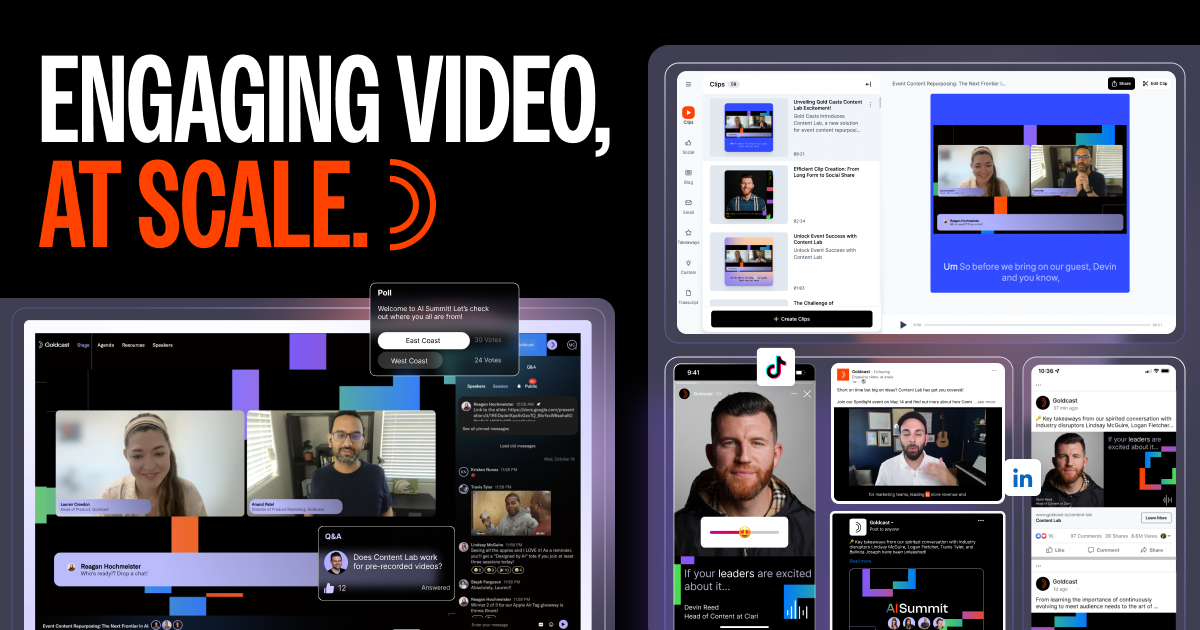
Goldcast provides comprehensive virtual and hybrid event solutions emphasizing engagement, design, and measurable results.
Features
Platform capabilities include:
- Multi-stream broadcasting in up to 1080p
- Customizable virtual venue spaces
- 1:1 and group video chat capabilities
- Webinars, polling, Q&A, surveys, and emoji reactions
- Automated emails and registration workflows
- Detailed analytics on engagement, content, and ROI
- Custom web, iOS and Android apps
Pricing
Goldcast offers these options:Lite – Free for under 25 attendees
- Pro – $99/month for up to 500 attendees
- Business – Custom pricing for over 500 attendees
Select features, services, and integrations incur additional charges.
Customization
Platform allows matching company and event aesthetics. Multiple templates enable further personalization.
User Experience
Reviews emphasize Goldcast’s smooth attendee experience on web and mobile apps. Virtual venue layouts encourage participation.
Support
Customer service remains available 24/7 through email, chat, phone, and online resources. Premium support packages offered.
Security
Platform uses 256-bit SSL encryption, SAML SSO, secure AWS data storage, and detailed user permissions.
Integrations
Connects with Office 365, Gmail, Eventbrite, SurveyMonkey, HubSpot, Marketo, Slack and more. APIs allow customization.
Reviews
Users praise engaging layouts, branding options, data insights, and responsive support. Platform achieves 4.5/5 Capterra rating.
Hopin

Hopin delivers all-inclusive virtual venue solutions that recreate authentic in-person experiences online.
Features
Notable capabilities include:
- Multi-stage video streaming up to 4K
- Expo and vendor booth capabilities
- Networking through group chat and 1:1 video
- Polls, Q&A, surveys, and interactive tools
- Automated email and registration workflows
- Detailed analytics on engagement and conversions
- Web and mobile apps adapted for platform
Pricing
Platform packages include:
- Free – For events under 100 attendees
- Starter – $99/month for 101-500 attendees
- Pro – $169/month for 501-3,500 attendees
- Enterprise – Custom pricing for 3,500+ attendees
Add-ons available for expanded services and capabilities.
Customization
Hopin provides templates and themes for branding, plus options to modify colors, logos, and event pages.
User Experience
Platform emphasizes intuitive operation for organizers and attendees. Users consistently mention easy navigation and reliable streaming.
Support
Platform maintains 24/7 customer support via chat, email, phone, and knowledge base. Account management services available.
Security
Hopin implements enterprise-grade security protocols including 256-bit SSL encryption, SOC 2 compliance, and ISAO verified security practices.
Integrations
Connects with YouTube, Twitch, Salesforce, HubSpot, Marketo, Slack, and 70+ additional apps. Developer APIs available.
Reviews
Users value event-focused features, modern interface, engagement tools, quality production, and helpful support. Platform rated 4.7/5 on Capterra.
Whova
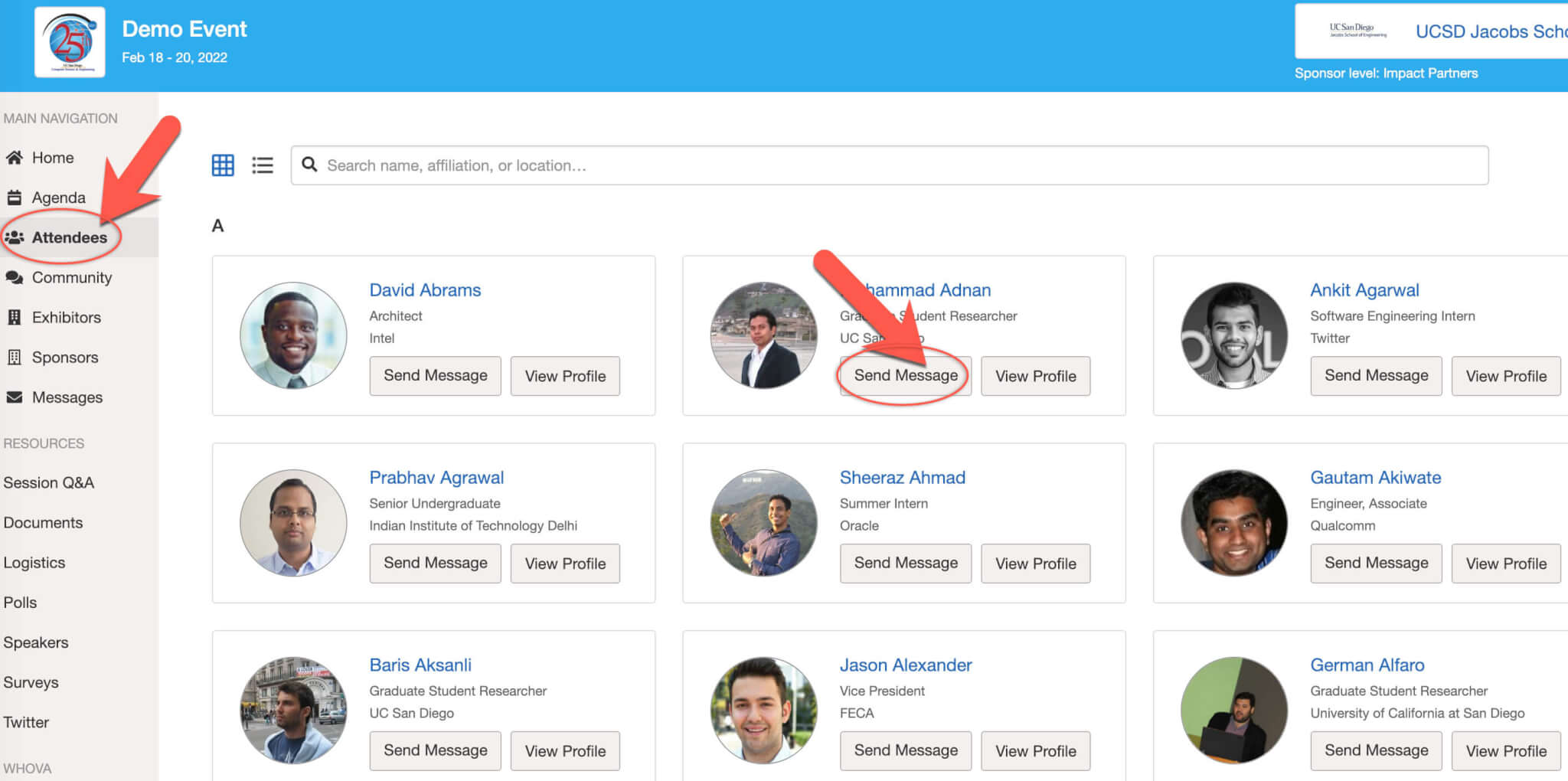
Whova delivers unified event app and website creation tools for virtual, hybrid, and in-person events.
Features
Platform capabilities include:
- Webinars, streaming, and video conferencing
- Gamification through live polls, quizzes, and leaderboards
- Private chat and 1:1 video calls
- Customizable schedules, maps, and profiles
- Full-featured event apps for iOS, Android, and web
- Attendee management, registration, and e-tickets
- Actionable analytics for engagement and event ROI
Pricing
Whova structures pricing as:
- Free – For events under 100 attendees
- Basic – $1,490/year for up to 300 attendees
- Pro – $2,990/year for up to 1,000 attendees
- Enterprise – Custom pricing for over 1,000 attendees
Additional services and features require extra fees.
Customization
Platform offers templates to adapt branding for websites and event apps. Additional UI modifications available.
User Experience
Strong emphasis on user satisfaction. Reviews consistently mention intuitive platform design and seamless app functionality.
Support
Platform provides continuous assistance via live chat, email, phone, and online resources. Dedicated event consultants available.
Security
Whova employs enterprise-level security including 256-bit TLS encryption, SOC 2 compliance, and ISO certification.
Integrations
Connects with Webex, ON24, Intrado, HubSpot, Salesforce, Marketo and more. Custom APIs enable deeper connections.
Reviews
Users highlight powerful mobile event apps, straightforward platform interface, valuable analytics, and exceptional support. Platform maintains 4.7/5 on Capterra.
Easy starting packages • Advanced options • Proven results
Eventee

Eventee combines artificial intelligence with comprehensive tools for creating branded virtual, hybrid, and in-person events.
Features
Platform delivers:
- Broadcast studio streaming quality up to 4K
- Customizable virtual event spaces
- Automated session scheduling tools
- Integrated webinars, chat, and video networking
- Registration management and e-ticketing
- Lead capture forms and product showcases
- Real-time data analytics for engagement and sales
- Custom web and mobile apps
Pricing
Platform packages include:
- Free – For up to 50 attendees
- Pro – $99/month for up to 500 attendees
- Business – Custom pricing for over 500 attendees
Additional fees apply based on features, integrations, services, and support requirements.
Customization
Eventee enables complete modification of branding, themes, logos, and design templates to match event aesthetics.
User Experience
AI optimization enhances platform navigation. Users praise intuitive design and reliable event delivery across devices.
Support
Customer service available 24/7 through phone, email, chat, and online knowledge base. Premium support packages offered.
Security
Platform implements enterprise-grade protocols including 256-bit SSL encryption, SSO authentication, and secure AWS data storage.
Access controls and permissions strengthen security.
Integrations
Connects with Salesforce, Marketo, Hubspot, Slack, Eventbrite, YouTube, and more. Developer APIs enable custom connections.
Reviews
Users emphasize reliable streaming, engaging custom spaces, lead generation tools, data insights, and strong support. Platform achieves 4.6/5 Capterra rating.
ON24

ON24 specializes in recreating live experiences through virtual and hybrid events, webinars, conferences, and branded studios.
Features
Platform capabilities include:
- Broadcast studio quality video up to 4K resolution
- Customizable virtual environments and exhibitor booths
- Advanced webinar features like polls, Q&A, and screen sharing
- Automated follow up of sales leads and attendee data
- Comprehensive reporting on event analytics and ROI
- Personalized experiences through web and mobile apps
Pricing
ON24 offers these tiers:
- Pro – $99/month for 100-attendee webinars
- Premium – Custom pricing for branded studios and larger events
- Enterprise – Custom pricing with volume discounts
Usage, add-ons, and services affect final costs.
Customization
Various studio environments adapt with brand assets, colors, graphics, and themes. Additional UI branding available.
User Experience
Platform creates broadcast-style event experiences. Users appreciate polished presentation and intuitive engagement tools.
Support
ON24 provides continuous customer support plus launch managers, success managers, and premium services for large events.
Security
Platform maintains SOC 2 compliance and uses encryption, access controls, and secure data centers to protect user information.
Integrations
Connects with marketing and sales tools like Salesforce, Marketo, HubSpot. New integrations possible through API.
Reviews
Users value high production quality, measurable ROI, customizable studio environments, and helpful customer support. Platform earns 4.7/5 on G2.
Brandlive

Brandlive provides self-service virtual and hybrid event solutions that prioritize audience participation.
Features
Platform capabilities include:
- Multi-stream HD video broadcasting
- Interactive chats, Q&A, and polls
- Customizable landing pages and registration
- Webinars, speaker rooms, and session lobbies
- Integrated email and CRM capabilities
- Automated follow-up and surveys
- Detailed analytics for audience insights
- Optimized experience across web and mobile
Pricing
Platform options include:
- Lite – Free for events under 50 attendees
- Pro – $99/month for up to 500 attendees
- Enterprise – Custom pricing for over 500 attendees
Add-ons available for expanded services, support, and capabilities.
Customization
Platform allows branding with logos, themes, colors, and unique landing pages. Template modifications available.
User Experience
Interface maximizes simplicity for organizers and engagement for viewers. Mobile optimization receives special attention.
Support
All subscribers receive email and chat support. Advanced tiers include live training, launch management, and event producers.
Security
Brandlive uses encryption, access controls, and secure data storage. Meets SOC 2 compliance requirements.
Integrations
Connects with Salesforce, Marketo, SurveyMonkey, tubular, ON24, and more. API access enables additional connections.
Reviews
Users appreciate straightforward interface, interactive tools, mobile optimization, analytics, and reliable support. Platform achieves 4.6/5 rating on G2.
Sequel

Sequel combines artificial intelligence with virtual and hybrid event capabilities to create personal connections and actionable insights.
Features
Platform delivers:
- Broadcast-quality video production and streaming
- Customizable virtual networking environments
- 1:1 video meetings and group conversations
- Engagement analytics and sales tracking
- Integrated calendars, email, and CRM capabilities
- Automated follow-up based on interactions and interests
- Personalized web and mobile experiences
Pricing
Platform tiers include:
- Team – $49/month for up to 25 attendees
- Pro – $149/month for up to 100 attendees
- Business – Custom pricing for over 100 attendees
Additional services and capabilities affect final pricing.
Customization
Sequel enables comprehensive branding of logos, colors, themes, and templates. Custom virtual environments available.
User Experience
AI-powered platform optimizes experiences for organizers and attendees. Users highlight natural, engaging atmosphere.
Support
Customer service available 24/7 via chat, email, phone, and online knowledge base. Account management services offered.
Security
Platform implements enterprise-grade security including 256-bit SSL encryption, SSO authentication, SOC 2 compliance, and ISO certification.
Integrations
Primary connections include Salesforce, HubSpot, Marketo, Slack, Eventbrite, and others. API enables custom solutions.
Reviews
Users value personal experience, data-driven insights, customization, intuitive interface, and exceptional support. Platform maintains 4.8/5 Capterra rating.
As a preferred production partner with top virtual event platforms, we get exclusive discounts and pass the savings along to our clients.
Cvent
Cvent delivers comprehensive virtual and hybrid event marketing and management solutions for planners and marketers.
Features
Platform includes:
- Webinars, streaming, and video conferencing
- Customizable registration and ticket sales
- Email marketing and follow up automation
- Analytics on engagement, sales, and ROI
- Mobile event apps for attendees
- Exhibitor directory and sponsor management
- Integration with venue sourcing and RFP tools
Pricing
Cvent offers three packages:
- Express – $379/month base fee
- Pro – Custom quote based on needs
- Enterprise – Custom quote based on needs
Select features and services require additional fees.
Customization
Platform provides custom branding of logos, colors, and event microsites. Users can select templates or create unique designs.
User Experience
Interface prioritizes accessibility for organizers and attendees. Centralized management streamlines execution.
Support
Round-the-clock support available through phone, email, and chat. All subscribers receive dedicated account manager service.
Security
Cvent maintains PCI, SOC 2, and GDPR compliance while using encryption, access controls, and secure data centers.
Integrations
Connects with CRM, marketing, sales, and web conferencing tools. Open API enables building custom solutions.
Reviews
Users value comprehensive event management capabilities, detailed analytics, sponsorship tools, mobile apps, and helpful support. Platform earns 4.4/5 Capterra rating.
Cisco Webex Events
Webex Events provides complete virtual event solutions emphasizing engagement, branding, and measurable outcomes.
Features
Platform delivers:
- HD video broadcasting with screen sharing
- Customizable virtual environments
- Exhibitor booths, demos, and interactive elements
- Advanced webinar capabilities
- Integrated chat, Q&A, and polling
- Lead capture forms and sales pipeline tracking
- Automated emails, registration, and surveys
- Detailed analytics on engagement and conversions
Pricing
Platform options include:
- Free – For meetings under 50 attendees
- Pro – Starting at $35/month for up to 1,000 attendees
- Enterprise – Custom pricing for over 1,000 attendees
Additional services like support and storage affect pricing.
Customization
Environments, booths, lobbies adapt with branding elements. Multiple templates enable further modification.
User Experience
Platform emphasizes smooth navigation and seamless attendee experiences across devices.
Support
Customer support available 24/7 via phone, chat, and online knowledge base. Enterprise plans include launch managers.
Security
Platform uses encryption, access controls, SOC 2 compliance, and additional measures to protect user data and privacy.
Integrations
Primary connections with CRM, marketing, and analytics tools provided. API enables custom solutions.
Reviews
Users value engaging virtual environments, data-driven insights, branding capabilities, attendee experience, and strong support. Platform maintains 4.7/5 G2 rating.
Move beyond basic online gatherings that fail to generate results.
Our experienced team creates memorable online experiences that deliver real value.
With extensive virtual production expertise, We & Goliath brings together knowledge, tools and dedication to craft perfect custom virtual solutions.
Connect today to explore possibilities – we help you engage attendees, inspire action, and increase revenue.
From education to fundraising to sales, we create innovative solutions for impactful online events.
Schedule your free virtual event platform strategy session and partner with specialists who ensure your next event succeeds.
Make your next virtual experience extraordinary.


